
Feeling overwhelmed by endless to-do lists and tight deadlines? Managing research, content creation, and visual design manually eats up hours of your workday.
Using modern AI productivity tools can handle repetitive tasks so you focus on high-value strategy. Discover how ChatGPT, Claude, and Midjourney compare and how to combine them into one seamless daily workflow.
Why You Need AI Productivity Tools in Your Workflow
Working harder is not the same as working smarter. Today’s top AI productivity tools act as digital assistants that draft emails, summarize complex documents, and design custom visuals in seconds.
Integrating the right combination of AI productivity tools into your routine can save you 10 to 15 hours every week. Instead of replacing your skills, these platforms supercharge your output and eliminate creative blocks.
ChatGPT: The Versatile AI Productivity Tool for Daily Tasks
ChatGPT by OpenAI remains one of the most popular AI productivity tools available today. It excels at brainstorming ideas, troubleshooting code, and writing quick drafts.
Key Features
- Custom GPTs: Build specialized assistants tailored to your specific projects.
- Web Browsing: Search the live internet for up-to-date research and data.
- Data Analysis: Upload spreadsheets to generate instant charts and business insights.
Best Use Case
Use ChatGPT as your daily sounding board. It works best for fast answers, structuring outlines, writing code snippets, and managing daily task lists.
Pros & Cons
- Pros: Fast response times, versatile features, massive community support.
- Cons: Can sound generic without clear prompting instructions.
Claude: The Best AI Productivity Tool for Long-Form Writing
Created by Anthropic, Claude stands out among writing-focused AI productivity tools for handling huge blocks of text with smooth, natural language.
Key Features
- Massive Context Window: Upload entire PDFs, ebooks, or codebases at once.
- Nuanced Tone: Writes with clear transitions and professional phrasing.
- Artifacts Window: View and edit generated code, documents, or graphics right next to your chat.
Best Use Case
Pick Claude when you need deep research summaries, long reports, or detailed editing. It excels at maintaining a consistent tone across lengthy guides.
Pros & Cons
- Pros: Exceptionally natural writing style, handles massive file uploads easily.
- Cons: Standard free tier lacks real-time web browsing.
Midjourney: Visual AI Productivity Tools for Design
Midjourney generates studio-quality images from text prompts. It is an essential asset for marketers, designers, and content creators needing custom visual content.
Key Features
- Photorealistic Rendering: Creates realistic textures, lighting, and camera angles.
- Style Tuning: Control artistic styles, aspect ratios, and color palettes easily.
- Vary Region: Edit specific sections of an image without starting over.
Best Use Case
Use Midjourney to design blog hero images, social media banners, website mockups, and product concept art.
Pros & Cons
- Pros: Unmatched visual quality among graphic generation tools.
- Cons: Requires using Discord or a web portal, which has a short learning curve.
Comparison of Leading AI Productivity Tools
| Feature | ChatGPT | Claude | Midjourney |
| Primary Role | General Tasks & Logic | Long-Form Writing & Analysis | Visual & Image Generation |
| Input Type | Text, Voice, Files, Images | Text, Large Files, Images | Text & Image Prompts |
| Ease of Use | Very Easy | Very Easy | Moderate |
| Best For | Daily multitasking & logic | In-depth drafting & summary | Custom graphics & design |
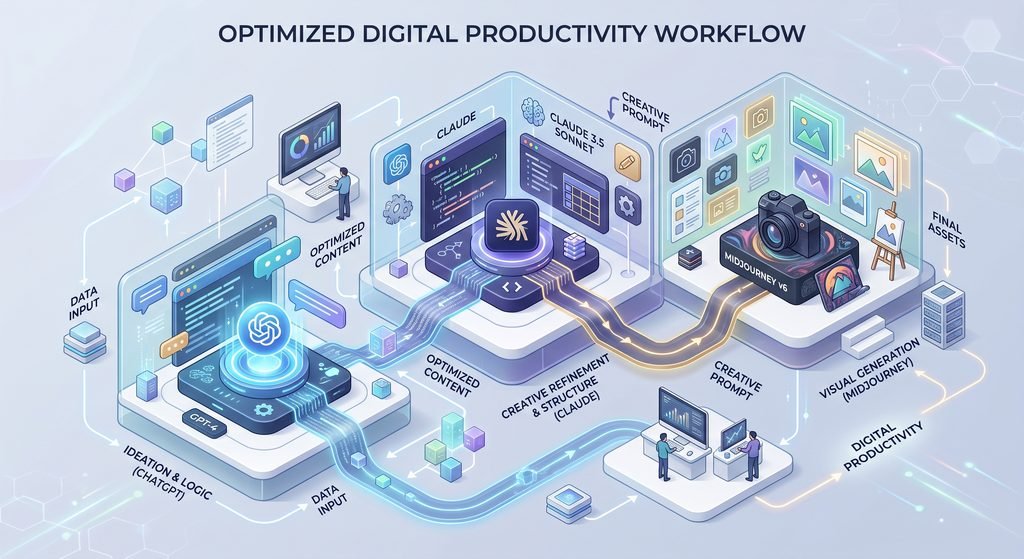
Step-by-Step Workflow Using AI Productivity Tools
Combining these three platforms creates a streamlined production pipeline. Here is how to complete a full content project in under 30 minutes:
- Research & Outline (ChatGPT): Ask ChatGPT to list key user pain points and draft an initial outline.
- Draft & Refine (Claude): Feed the outline into Claude along with your tone guidelines to generate natural body paragraphs.
- Create Custom Visuals (Midjourney): Generate a unique blog hero image using Midjourney to match your written article.
If you want to improve your prompts for better results, check out our guide on prompt optimization.
Final Thoughts on AI Productivity Tools
You do not need every tool on the market to stay productive. Start by identifying your biggest daily bottleneck.
- Choose ChatGPT if you need a flexible assistant for varied everyday tasks.
- Pick Claude if you write long reports or need deep document summaries.
- Use Midjourney if custom visual content drives your marketing campaigns.
Test one tool at a time, build your prompt library, and watch your daily output double.
Image Prompts & Alt Text
Featured Image
- Prompt: A clean modern office desk top-down view, sleek laptop showing colorful AI data visualization graphs, minimalist aesthetic, soft natural morning sunlight from a window, subtle bokeh, shot on 35mm lens, photorealistic, professional lighting –ar 16:9
- WordPress Alt Text: Best AI productivity tools workflow setup on a modern office desk
In-Article Image
- Prompt: An isometric 3D illustration of a digital workspace showing connected icons representing writing, coding, and visual design tools, soft blue and purple pastel tones, clean tech aesthetic, white background –ar 16:9
- WordPress Alt Text: Comparison diagram of top AI productivity tools for writing design and coding